If you sell products or services, one of the most important numbers in your business is your profit margin. Many people know their selling price and cost, but they are not sure how much profit they actually keep from each sale.
A Percentage Margin Calculator solves this problem in seconds. Enter the selling price and the cost price, and the calculator instantly shows your profit amount and profit margin percentage.
This guide explains what percentage margin means, how the calculator works, the formula behind it, and how to use the result to make better pricing decisions.
Visit Now: Salary and Tax Estimator USA
What Is a Percentage Margin Calculator?
The percentage margin (also called profit margin) shows what percentage of your selling price is actual profit after covering the cost of the product or service. Percentage Margin Calculator. It is one of the most important financial metrics because it helps you understand how much money you keep from each sale.
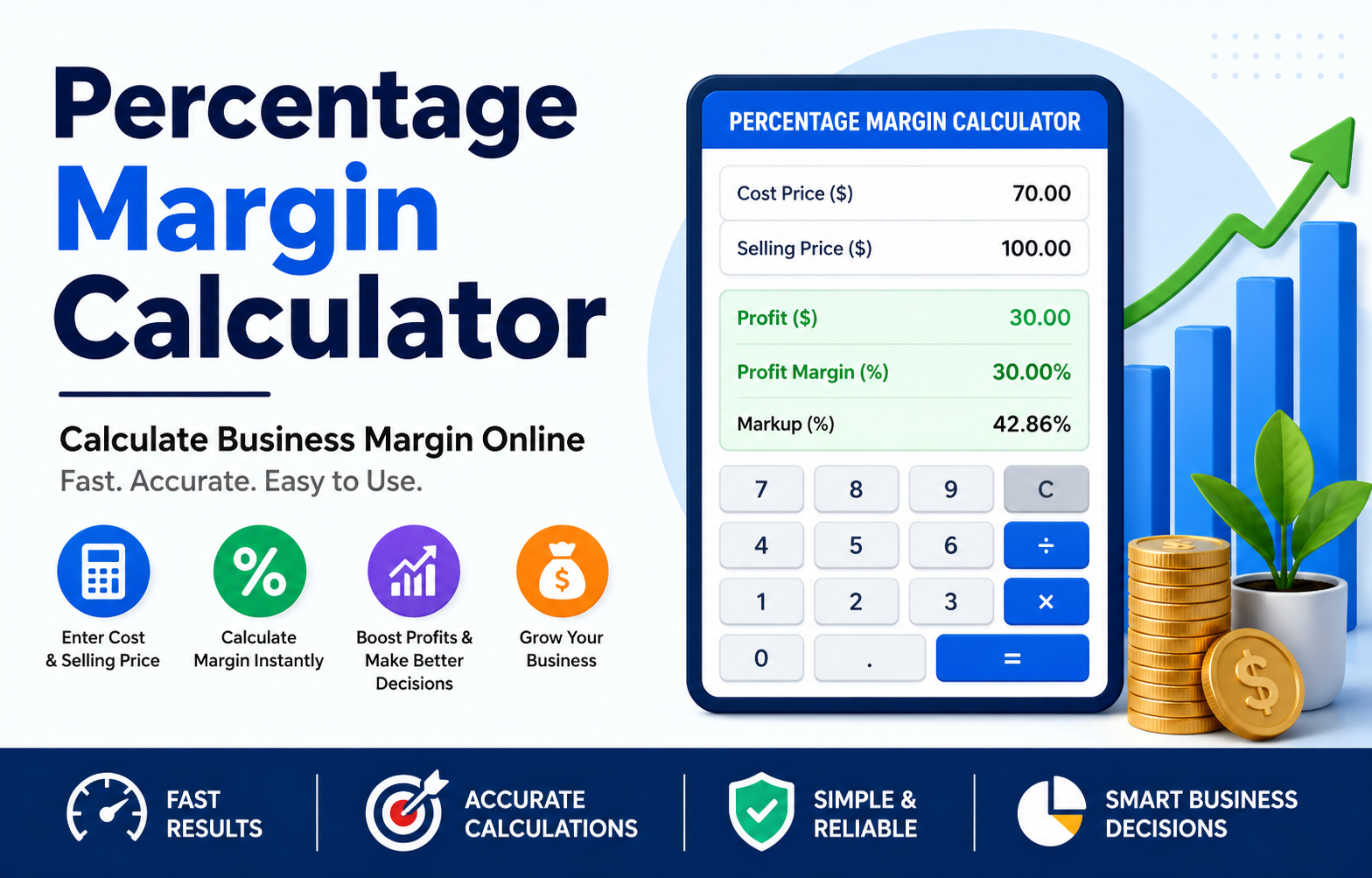
For example, if you sell a product for $100 and it costs $70 to buy or make, your profit is $30. The percentage margin tells you what portion of the $100 selling price is profit.
Profit Margin = 30%
This means 30 cents of every dollar you earn from sales is profit before other business expenses, such as rent, employee wages, marketing, taxes, and utility bills. The remaining 70 cents covers the cost of producing or purchasing the product.
A higher percentage margin usually means your business is earning more profit from each sale, while a lower margin may indicate that your costs are too high or your selling prices are too low. Regularly tracking your profit margin helps you make smarter pricing decisions, control costs, and improve the overall profitability of your business.
Read More: Percentage Savings CalculatorWhat Does a Percentage Margin Calculator Do?
A Percentage Margin Calculator helps you quickly work out how much profit you make on a sale and what percentage of the selling price is profit. Percentage Margin Calculator. Instead of using formulas or doing the maths yourself, you simply enter two values and the calculator does the rest in seconds.
The calculator takes two numbers:
- Cost Price – what the product or service costs you to buy, produce, or deliver.
- Selling Price – the amount you charge the customer for the product or service.
It then calculates:
- Profit (Selling Price − Cost Price)
- Profit Margin (%)
- Sometimes, Markup (%) is provided as an additional result, allowing you to compare margin and markup side by side.
This is much faster and more accurate than calculating the percentage manually. It also helps reduce calculation errors, saves time, and makes it easier to set profitable prices. Whether you are a small business owner, retailer, freelancer, or online seller, a Percentage Margin Calculator gives you instant results so you can make better pricing and business decisions with confidence.
Percentage Margin Formula
The standard formula is:
Profit Margin (%) = (Selling Price − Cost Price) ÷ Selling Price × 100
Where:
- Selling Price = amount charged to the customer.
- Cost Price = amount paid to buy or produce the item.
- Selling Price − Cost Price = profit.
Step-by-Step Example
Suppose:
- Cost Price = $80
- Selling Price = $120
Step 1: Find the profit
Profit = $120 − $80 = $40
Step 2: Divide profit by selling price
40 ÷ 120 = 0.3333
Step 3: Convert to a percentage
0.3333 × 100 = 33.33%
Profit Margin = 33.33%
So, one-third of the selling price is profit.
Quick Margin Examples
| Cost Price | Selling Price | Profit | Margin |
|---|---|---|---|
| $50 | $75 | $25 | 33.33% |
| $80 | $120 | $40 | 33.33% |
| $100 | $150 | $50 | 33.33% |
| $120 | $150 | $30 | 20% |
| $200 | $260 | $60 | 23.08% |
Notice that the margin changes when the relationship between cost and selling price changes.
Margin vs Markup (Most Common Mistake)
Many business owners confuse margin and markup. They are not the same.
Margin Formula
Margin (%) = Profit ÷ Selling Price × 100
Markup Formula
Markup (%) = Profit ÷ Cost Price × 100
Example
- Cost = $80
- Selling Price = $120
- Profit = $40
A 50% markup produces only a 33.33% margin. This difference is very important when setting prices.
How to Use the Online Calculator
Using a Percentage Margin Calculator is simple.
Step 1: Enter the Cost Price
Type the amount you paid to buy or produce the product.
Step 2: Enter the Selling Price
Type the price you charge your customer.
Step 3: Click Calculate
The calculator instantly displays:
- Profit
- Profit Margin (%)
- Markup (%) (if included)
Step 4: Review the Result
Use the margin percentage to decide whether the price is high enough to cover overheads and provide the profit you want.
Real Business Examples
Retail Store
- Cost of a T-shirt: $12
- Selling price: $20
- Profit: $8
- Margin: 40%
The store keeps 40% of each sale before paying rent, staff wages, and other expenses.
Online Seller
- Product cost: $25
- Shipping and packaging: $5
- Total cost: $30
- Selling price: $45
Profit = $15
Margin = 15 ÷ 45 × 100 = 33.33%
Always include all direct costs when calculating margin.
Freelance Designer
- Project cost (software, subcontractor, etc.): $200
- Client fee: $500
- Profit: $300
- Margin: 60%
Service businesses can also use the same formula.
Why Profit Margin Matters
Understanding your profit margin is important because it shows how much money your business keeps from each sale. Regularly tracking your margin can help you make smarter financial decisions and improve long-term profitability.
Better Pricing Decisions
Without knowing your margin, you may price products too low and lose money without realizing it. Calculating your margin helps you set prices that cover your costs while still generating a healthy profit.
Compare Products
Margins help identify which products are the most profitable. This allows you to focus on promoting high-margin products and review or improve the pricing of products with lower margins.
Control Costs
If the margin falls, you can investigate whether costs have increased or selling prices are too low. Monitoring your margins regularly helps you spot problems early and take action before they affect your business.
Plan Growth
Healthy margins provide cash for marketing, hiring, new equipment, product development, and business expansion. Strong profit margins also give your business greater financial stability during slower sales periods.
What Is a Good Profit Margin?
There is no single perfect profit margin because it varies by industry, business size, and operating costs. For example, a grocery store may work with much lower margins than a software company or a consulting business.
Instead of aiming for a universal number, compare your margin with competitors in your industry. Tracking your own margins over time is equally important, as steady improvements usually indicate that your pricing strategy and cost management are becoming more effective. Regularly reviewing your profit margin helps you stay competitive and make informed business decisions.
Finding the Selling Price for a Target Margin
Sometimes you know the cost and the desired margin and need to find the selling price.
Formula
Selling Price = Cost Price ÷ (1 − Margin%)
(Use the margin as a decimal.)
Example: 40% Target Margin
- Cost = $60
- Margin = 40% = 0.40
Selling Price = 60 ÷ (1 − 0.40)
Selling Price = 60 ÷ 0.60 = $100
To achieve a 40% margin, you must sell the item for $100.
Common Mistakes to Avoid
Using Markup Instead of Margin
A 30% markup does not mean a 30% margin.
Forgetting Extra Costs
Include shipping, packaging, payment processing fees, commissions, and production costs.
Using Revenue Instead of Selling Price Per Item
Margin calculations should use the selling price for the same item or service being analyzed.
Rounding Too Early
Keep a few decimal places during calculations and round only the final percentage.
When Should You Check Margin?
Checking your profit margin regularly helps you understand how profitable your business is and whether your pricing strategy is working. You should check your margin whenever you:
- Launch a new product to ensure the selling price covers all costs and generates a healthy profit.
- Change prices so you can see how the adjustment affects your overall profit margin.
- Receive a supplier price increase, as higher costs can reduce your margin if your selling price stays the same.
- Run discounts or promotions to make sure you are still earning an acceptable profit after offering lower prices.
- Review monthly or quarterly performance to track profitability over time and identify areas for improvement.
- Compare sales channels (website, marketplace, wholesale, etc.) to find out which channel delivers the highest profit margin and the best overall business performance.
Regularly monitoring your margin helps you make better pricing decisions, control costs, and maintain long-term business profitability.
Regular monitoring helps prevent profitable sales from turning into losses.
Manual Calculation Cheat Sheet
Keep this table handy if you ever need to calculate margins without the online tool.
Frequently Asked Questions
Is profit margin the same as gross margin?
In this calculator, profit margin refers to gross profit margin based on direct costs and selling price. Net profit margin also subtracts operating expenses, taxes, and interest.
Can I use the calculator for services?
Yes. Replace cost price with the direct cost of delivering the service and the selling price with the fee charged to the client.
What if my selling price is lower than my cost?
The calculator will show a negative profit and a negative margin, meaning you are selling at a loss.
Why is my margin lower than my markup?
Because margin uses the selling price as the denominator, while markup uses the cost. The same profit produces different percentages.
How often should I update my costs?
Update costs whenever supplier prices, shipping charges, packaging costs, or production expenses change.
Conclusion
A Percentage Margin Calculator is one of the simplest and most useful tools for any business owner, freelancer, or online seller. By entering your cost price and selling price, you can instantly see how much profit you make and what percentage of each sale you keep.
Remember the key difference:
- Margin = Profit ÷ Selling Price
- Markup = Profit ÷ Cost Price
Using the correct margin calculation helps you price products accurately, protect profitability, and make smarter business decisions.
Whether you sell physical products, digital goods, or professional services, checking your margin regularly is a habit that can significantly improve your business performance. Use the online calculator whenever costs or prices change, and you will always know exactly where your profit stands.